Your post used to get a few thousand views. Same effort, same topic — now it gets a few hundred. You didn't change anything. You didn't get a warning. Nothing in your account looks different. But your reach has collapsed.
This is what creators call a shadow ban. LinkedIn doesn't use that word — they never will. But in their own Professional Community Policies, LinkedIn officially says they may "limit the visibility of content or accounts that engage in inauthentic or abusive behavior" — and they don't have to tell you. That's the official version of a shadow ban. And the rules for triggering one changed a lot in 2026.
This article uses "shadow ban," "throttling," and "reach suppression" interchangeably — they all describe the same mechanic. Everything below is anchored on sources published in 2026. No 2023 lore. No guru advice. Just what's verified, plus what's contested (we'll flag the difference).
TL;DR — The 6 Things to Know
- LinkedIn confirms they limit visibility — they just don't call it "shadow ban."
- You won't get a warning. For visibility throttling, the notification doesn't come.
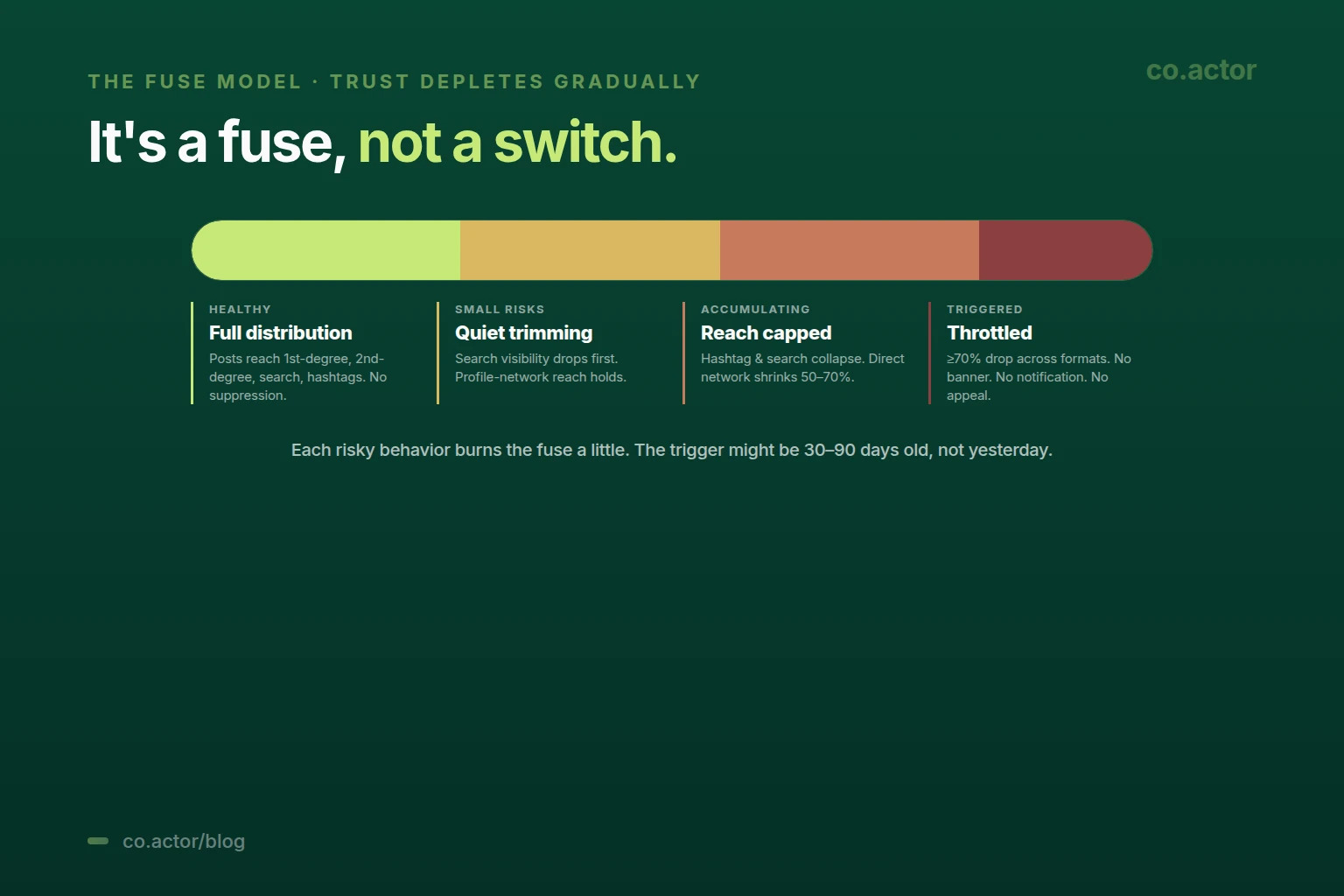
- It's not one switch — it's a fuse. Your account trust depletes gradually as you cross lines.
- 70%+ sudden drop = throttling. Gradual decline is normal; overnight collapse isn't.
- Five behaviors come up everywhere in 2026: automation, daily posting, link-heavy thin posts, hashtag spam, fake engagement.
- Recovery is behavioral, not technical. Stop the trigger, wait 1-4 weeks depending on severity, rebuild with on-platform content.
What LinkedIn Actually Does (And Doesn't Do)
There's a lot of confusion here. Let me separate it.
What LinkedIn Officially Confirms
From their Community Policies and Help Center:
- They reduce the visibility of content that looks spammy or inauthentic.
- They can restrict messaging, invitations, and posting.
- They send official banners when they fully restrict your account.
What LinkedIn Doesn't Confirm But Practitioners Consistently Report
- Quiet reach reduction without any notification.
- Posts that stop appearing in hashtag or keyword search results.
- Lower distribution to your own followers.
- Comments that get buried even on busy posts.
Think of it like a credit score for your account. Risky behavior over time chips away at the score. When it gets low enough, your reach is quietly capped. You don't see a banner — you just see numbers drop. This is why so many people say "my reach broke and I don't know why." The system is designed to be invisible, and the trigger may have been building up for months, not days.
What Triggers It in 2026
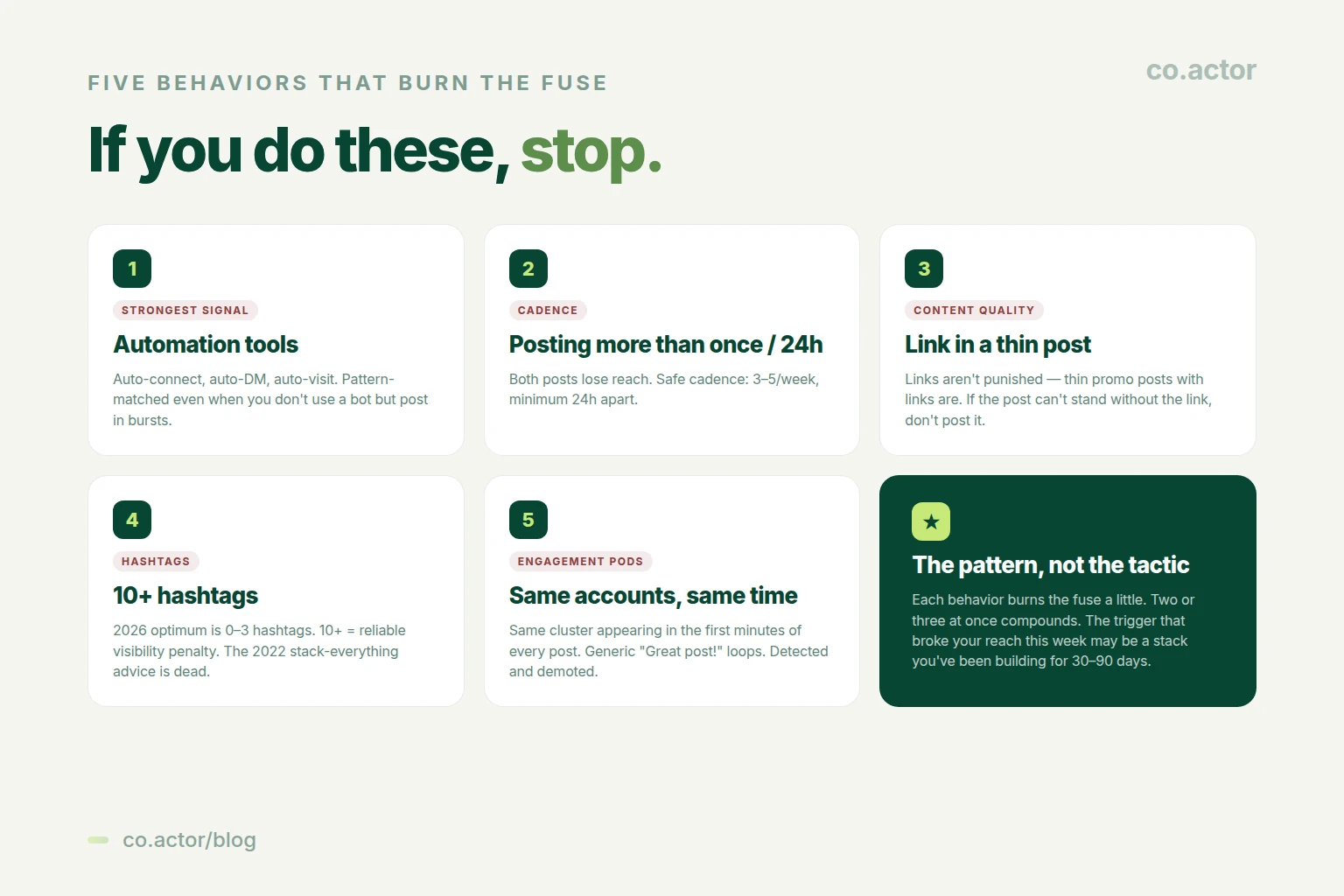
Five behaviors come up everywhere in 2026 — in LinkedIn's own policies, in creator testing, and in repeated community reports of reach collapse.
1. Automation Tools — Strongest Evidence
Any third-party tool that sends connections, messages, or visits profiles automatically — the entire category, not any one brand. LinkedIn's User Agreement explicitly prohibits automated access, scraping, and unauthorized bots.
The behavioral patterns LinkedIn is consistently reported to flag:
- Identical time intervals between actions (a connection request every 30 seconds for hours).
- Sudden bursts of activity that no human would do.
- Generic messages copy-pasted at scale.
- Profile visits without normal browsing patterns.
You don't have to use a bot to look like one. Sending dozens of identical connection requests manually in one evening can match the same pattern LinkedIn's system flags. For the sane outreach cadence, see our LinkedIn cold DM strategy guide.
2. Posting More Than Once Per 24 Hours
A pattern that came up across creator testing in early 2026: posting twice within a 24-hour window tends to hurt reach on both posts, not just one. The algorithm appears to treat your second post as competing with your first for the same audience attention.
The safe cadence consistently recommended across the 2026 LinkedIn community: 3-5 posts per week, minimum 24 hours apart. More than that gives diminishing returns at best and triggers throttling at worst.
3. External Links in Thin Promotional Posts
External links are the most over-discussed and most-misunderstood trigger in 2026.
The honest reading: links are not automatically punished. Thin promotional posts with links are.
- A genuinely useful resource link inside a substantive post seems to work, sometimes outperforming link-free baselines.
- A link to your landing page dropped into a low-effort post is the penalty case.
- LinkedIn officially confirms it can downrank "inauthentic" or low-quality content — which is where most link-spammy posts land.
The real lever isn't where you put the link. It's whether the post can stand without it.
4. Hashtag Spam
The 2026 pattern is unanimous across creator tests: heavy hashtag use now hurts more than it helps.
- 0-3 hashtags for normal posts (this is the modern optimum).
- 4-5 hashtags only for events or specific campaigns.
- 10+ hashtags = reliable visibility penalty.
Posts with zero hashtags often outperform hashtag-stuffed equivalents. The "stack 20 hashtags for reach" advice from 2022 is dead.
5. Engagement Pods — Pattern-Level Detection
An engagement pod is a fixed group of people who agree to like and comment on each other's posts on a schedule, to artificially boost early engagement.
The patterns LinkedIn is reported to look for in 2026:
- The same set of accounts appearing in the first few minutes of every one of your posts.
- Short, generic comments ("Great post!", "Totally agree") repeated across the same cluster.
- "Comment 'INFO' to get the link" engagement bait followed by repetitive low-value exchanges.
LinkedIn's policies explicitly state that "inauthentic" engagement can result in distribution being limited. If you're in a pod and the pattern gets identified, your reach can drop suddenly.
How to Know If You're Affected
You can't ask LinkedIn directly. But you can look at five signals together. The key word is "together" — one bad number is just a bad day. Three or more dropping at the same time is a pattern.
The 2026 LinkedIn community calls this multi-surface collapse — your visibility doesn't just dip in one place, it drops on the feed, in search, in profile views, and in connection acceptance all at once.
Signal 1: Sudden 70%+ Impression Drop Across Multiple Posts
Not one bad post. Several posts in a row, dropping together, with no change in your content type or timing. Gradual 10-30% decline over months is normal — that's how the platform has been changing for everyone. Overnight 70%+ is not.
Signal 2: Profile Views Drop 60-90% for 2+ Weeks
You're still posting and commenting at the same rate. But the people viewing your profile vanished. Sustained 2+ weeks of this is a strong account-level signal, not a posting-quality issue.
Signal 3: Search and Hashtag Traffic to Zero
In your post analytics, look at "impressions by source." If Search and Hashtags sources collapse to near zero, but Direct or My Network still works — LinkedIn is limiting how findable you are to people outside your immediate circle.
Signal 4: Connection Acceptance Below 20%
Track your weekly acceptance rate. A sudden drop below 20% — when you're targeting the same kinds of people you used to — is one of the earliest community-reported signals of a trust problem at the account level. LinkedIn's own Help Center confirms that invitation behavior, including low acceptance rates, factors into how many invites you can send.
Signal 5: Your Posts Don't Appear When Contacts Check
Ask 3-5 connections (people you know who normally see your stuff) to look for your latest post in their feed and in your activity tab. If most can't find it, even though they engage with your content regularly, this is a strong sign your distribution is being limited.
Normal Decline vs Throttling
This is where most people get it wrong. Reach drops happen for many reasons. Most of them are not bans.
Normal Organic Decline Looks Like
- Drift down 10-30% over weeks or months.
- Uneven — some posts still perform well, others flop.
- Search and hashtag impressions stable.
- Profile views slightly down, not crashed.
- No notification (because there's nothing to notify).
Throttling Looks Like
- Sudden 70%+ drop across multiple posts in days.
- All formats affected, not just one type.
- Search and hashtag impressions near zero.
- Profile views crashed and staying low for 2+ weeks.
- Multiple of these happening at the same time.
If your reach has been slowly fading for 6 months, you probably don't have a shadow ban. You likely have content fatigue, a saturated audience, or the platform-wide reach decline that hit almost everyone in 2025-2026. Different problem, different fix — see our algorithm guide for that one.
What If You've Done None of the Five Triggers?
It happens. Common causes when no clear policy violation is involved:
- Someone reported your content (real or false reports can trigger reviews).
- A topic touched a sensitive area LinkedIn quietly suppresses (politics, certain financial advice).
- You logged in from a new country, IP, or VPN and got flagged for review.
- A genuine bug in LinkedIn's system (these happen and are usually fixed within days).
In these cases the recovery protocol is the same — cooldown, then rebuild — but you may also want to contact LinkedIn support, since you haven't actually violated anything.
Myths to Stop Believing
A lot of "LinkedIn rules" you still see in 2026 are from 2023 and were never verified.
- Myth: "Don't edit your post in the first hour or you'll kill reach." No 2026 study shows an edit penalty. Routine typo fixes have no effect on reach.
- Myth: "Links always lose 60% reach." Overstated. Some valuable links outperform baseline. The penalty is contextual, not flat.
- Myth: "Put links in the first comment to bypass the penalty." Outdated. First-comment links are now reportedly also penalized, and even when they're not, the effect is small.
- Myth: "You have a 90-minute window or your post dies." No rigid rule. Early engagement helps, but performance can continue building for days on substantive posts.
- Myth: "There's a specific dwell time threshold you need to hit." Dwell time is a signal — confirmed. But no public number exists for "X seconds = good." Every number in circulation is a guess.
The 4-Week Recovery Protocol
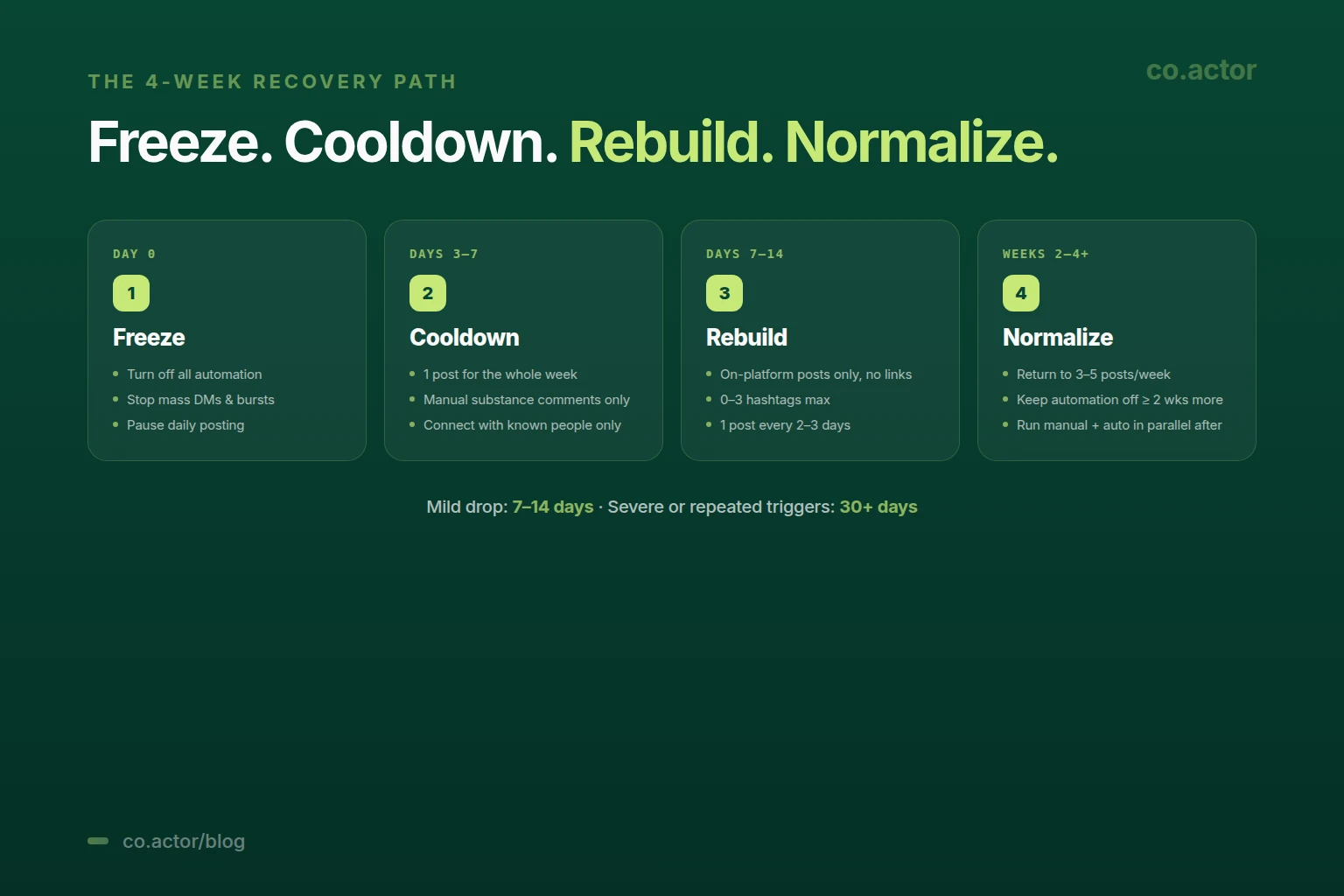
If you've checked the signals and you're sure your reach is throttled — here's the protocol consistently recommended across the 2026 LinkedIn community. For formal account restrictions with a banner, file an appeal through LinkedIn's Help Center.
Day 0: Freeze Risky Behavior
- Turn off ALL automation tools, immediately.
- Stop mass DMs and connection request bursts.
- Stop daily posting if that was your pattern.
- If a banner appeared, use LinkedIn's support form; provide ID if requested.
Day 0-1: Diagnose
- Look back over the last 30-90 days, not just the last week. The fuse model means the trigger may have been accumulating.
- Honestly list which of the 5 triggers you've been doing.
- Pick the riskiest one to cut first.
Days 3-7: Cooldown
- Minimal posting (maybe 1 post for the whole week).
- Manual substantive commenting only — 15+ word comments, not "great post!"
- Connect only with people you actually know.
Days 7-14: Rebuild
- On-platform posts only — no external links for now.
- 0-3 hashtags maximum.
- One post every 2-3 days.
- Real conversation in comments, not engagement bait.
Weeks 2-4+: Normalize Gradually
- If metrics climb, return to normal cadence (3-5 posts per week).
- If automation was the trigger, keep it off for at least 2 more weeks.
- When you do return to automation, run manual + automation in parallel for at least 2 weeks before letting automation run alone.
Realistic Recovery Timelines
- Mild reach drop: 7-14 days.
- Severe or repeated triggers: 30+ days.
- Formal account restriction with banner: depends on appeal outcome.
No source publishes "success rates" for recovery. Anyone who tells you "I unbanned 200 accounts" can't prove it. What every credible source says: recovery is possible, but it requires you to actually stop the behavior, not just pause it for a week.
The Uncomfortable Truth
A lot of throttled accounts in 2026 weren't unlucky — they were doing something risky and not realizing it. Not one big mistake, but a slow accumulation of behaviors that look bot-like or spammy in aggregate.
The creators who never get throttled tend to share a boring routine: 3 posts a week, no automation, 0-3 hashtags, real value, and engagement with real people one comment at a time.
There's no hack. There's no clever workaround. The system in 2026 is designed to reward people who treat LinkedIn like a professional network and to quietly suppress anyone trying to game it at scale.
If your reach has collapsed, the first question is rarely "how do I recover?" It's usually "which of the 5 triggers have I actually been doing, even a little?"
Action Items This Week
If Your Reach Feels Normal
- Export 90 days of post analytics now — so you have a real baseline if reach ever drops later.
- Audit your last 30 days against the 5 triggers — find the riskiest behavior you do (everyone has one) and reduce it before it accumulates.
If Your Reach Feels Broken
- Run the 5-signals test — impressions, profile views, search traffic, connection acceptance, feed visibility.
- Honestly audit the last 30-90 days — which of the 5 triggers fits?
- Cut the riskiest one for 14 days, then follow the recovery protocol.
Frequently Asked Questions
Is the LinkedIn shadow ban real?
LinkedIn doesn't use the term but officially confirms they may "limit the visibility of content or accounts that engage in inauthentic or abusive behavior" — without notifying you. Same mechanic, different name.
How do I detect a shadow ban?
Five signals together: 70%+ impression drop across multiple posts; profile views down 60-90% for 2+ weeks; search/hashtag impressions near zero; acceptance rate below 20%; contacts can't find your posts. Three or more = multi-surface collapse.
What triggers it?
Five behaviors: automation tools (or human bursts that look like them); posting more than once per 24h; external links in thin promo posts; 10+ hashtags; engagement pods. The fuse depletes gradually — multiple at once compounds.
How long does recovery take?
Mild: 7-14 days. Severe or repeated: 30+ days. Formal restriction with banner: depends on appeal. Recovery requires actually stopping the behavior, not pausing it.
Do external links kill reach?
Overstated. Links inside substantive posts often work. Thin promo posts with links are the penalty case. The lever is whether the post stands without the link.
Can I edit posts without losing reach?
Yes — the 2023 edit-penalty myth is not supported in 2026 data. Typo fixes are routine and have no effect on reach.
What if I haven't done any triggers and reach still dropped?
Possible causes: false reports, sensitive topic, new IP/VPN flag, LinkedIn bug. Recovery protocol is the same; also consider contacting support directly.
Run a Sustainable LinkedIn System (Not One That Triggers the Fuse)
Serge Bulaev is the CEO and founder of Co.Actor, a LinkedIn growth platform for B2B founders and their teams. He writes about content systems, profile positioning, and how the LinkedIn algorithm actually rewards modern creators.
Sources
- LinkedIn — Professional Community Policies
- LinkedIn — User Agreement
- LinkedIn Help Center
- 2026 creator testing and community reports (consolidated from January-May 2026 sources)
Related Reading
Written by
