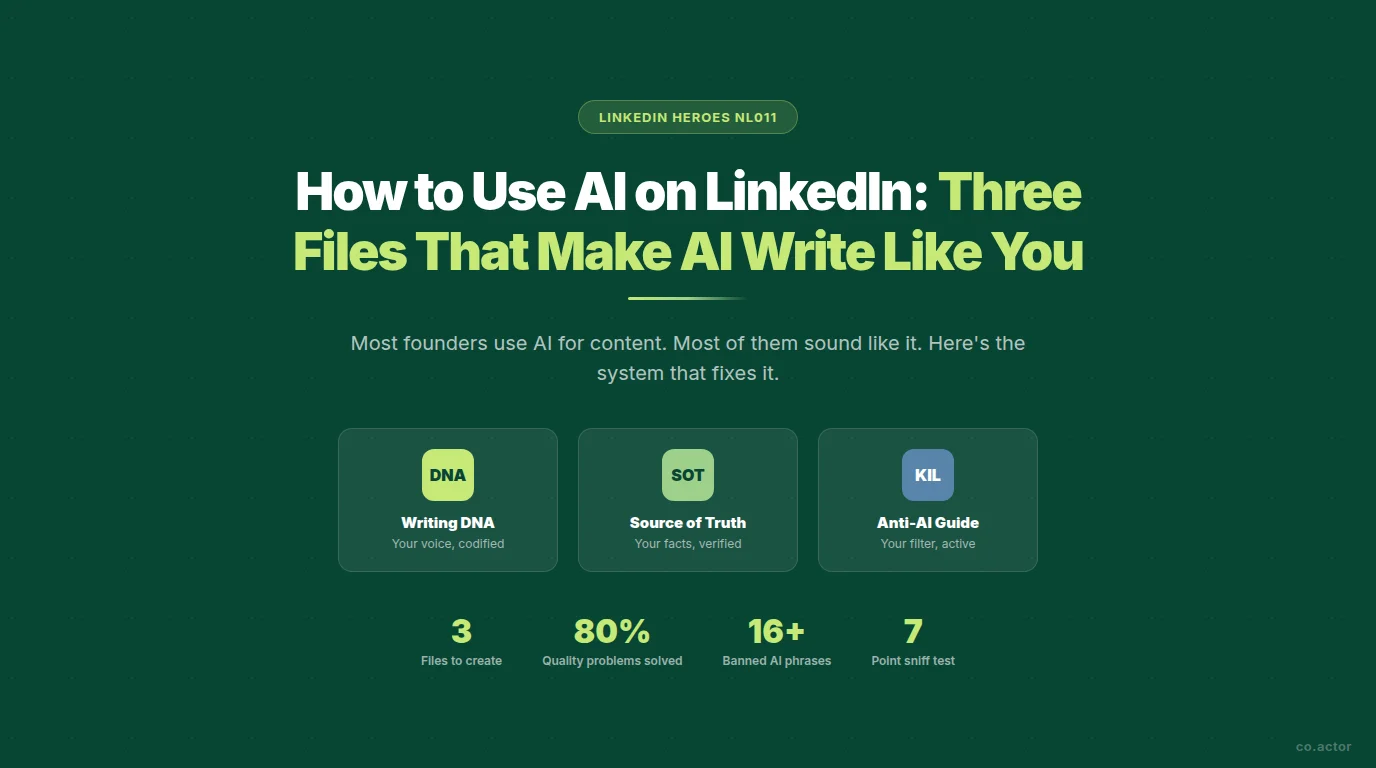
Most founders are using AI for LinkedIn content. Most of them sound like it. The 2025 Edelman B2B Thought Leadership Study found that the majority of B2B decision-makers can identify AI-generated content on sight — and when they do, it actively reduces their trust in the author.
The problem isn't AI. The problem is that most people give AI nothing to work with. No voice reference. No factual grounding. No filter for the phrases that mark content as machine-made.
This article is a toolkit. Three files, three prompts, copy-paste ready. By the end you'll have everything you need to use AI for LinkedIn content without sounding like you ran your post through a content mill.
TL;DR — What You'll Build
- AI sounds like AI because you haven't given it a voice to imitate — your voice, specifically
- The Writing DNA teaches AI your real writing patterns, edge, and beliefs
- The Source of Truth stops hallucination — AI invents facts when you don't provide them
- The Anti-AI Writing Guide is a kill list of banned phrases that signal machine-made content
- Three files uploaded once solve 80% of AI content quality problems permanently
- The 7-point sniff test catches what slips through — run it before every post
Why Most AI Content Fails on LinkedIn
AI adoption for content creation is nearly universal now. But the output is converging toward a single, recognizable voice — the statistical average of everyone who ever wrote a LinkedIn post.
The reason is simple. When you open ChatGPT or Claude and type "write a LinkedIn post about leadership," the AI has no idea who you are. It doesn't know your writing style, your real numbers, or what you'd never say. So it produces something that could have been written by anyone, for anyone, about anything.
The founders who use AI well aren't using different tools. They're using the same tools with a system behind them. That system has three components.
File 1: Your Writing DNA
The most common complaint about AI-generated content: "It doesn't sound like me."
A Writing DNA document teaches AI your real writing patterns — not a generic "be conversational" instruction, but the specific edge in your thinking, how your tone shifts when you're skeptical versus excited, what you'd never say, and what makes your writing immediately recognizable to anyone who knows your work.
When you upload it to a Claude Project or ChatGPT, every piece of content starts from your voice rather than the statistical average. The difference is measurable. Without it, AI writes toward the middle. With it, AI writes toward your edge.
The Writing DNA Prompt
Paste this prompt into Claude or ChatGPT and answer the questions. The AI will generate the file for you.
Save the output as Writing_DNA.md and upload it to every AI project where you create content. You'll never need to say "write in my voice" again — the AI will already know.
File 2: Your Source of Truth
The second reason AI content fails: hallucination. Not the dramatic kind — AI rarely invents a business you never ran. The common kind is subtler. AI writes "I've worked with hundreds of clients" when your real number is 34. It says "I've been in this industry for years" when you launched in March 2022. It uses round numbers instead of your actual numbers.
Vague content reads as AI. Specific content reads as human. The problem isn't that AI lies — it's that AI generalizes when it doesn't have facts. A Source of Truth gives it the facts.
The Source of Truth Prompt
The rule is simple: if it's not in the Source of Truth, AI shouldn't say it. Fact-check the output ruthlessly. Every number, every date, every claim. One wrong fact in the document gets reproduced in every post.
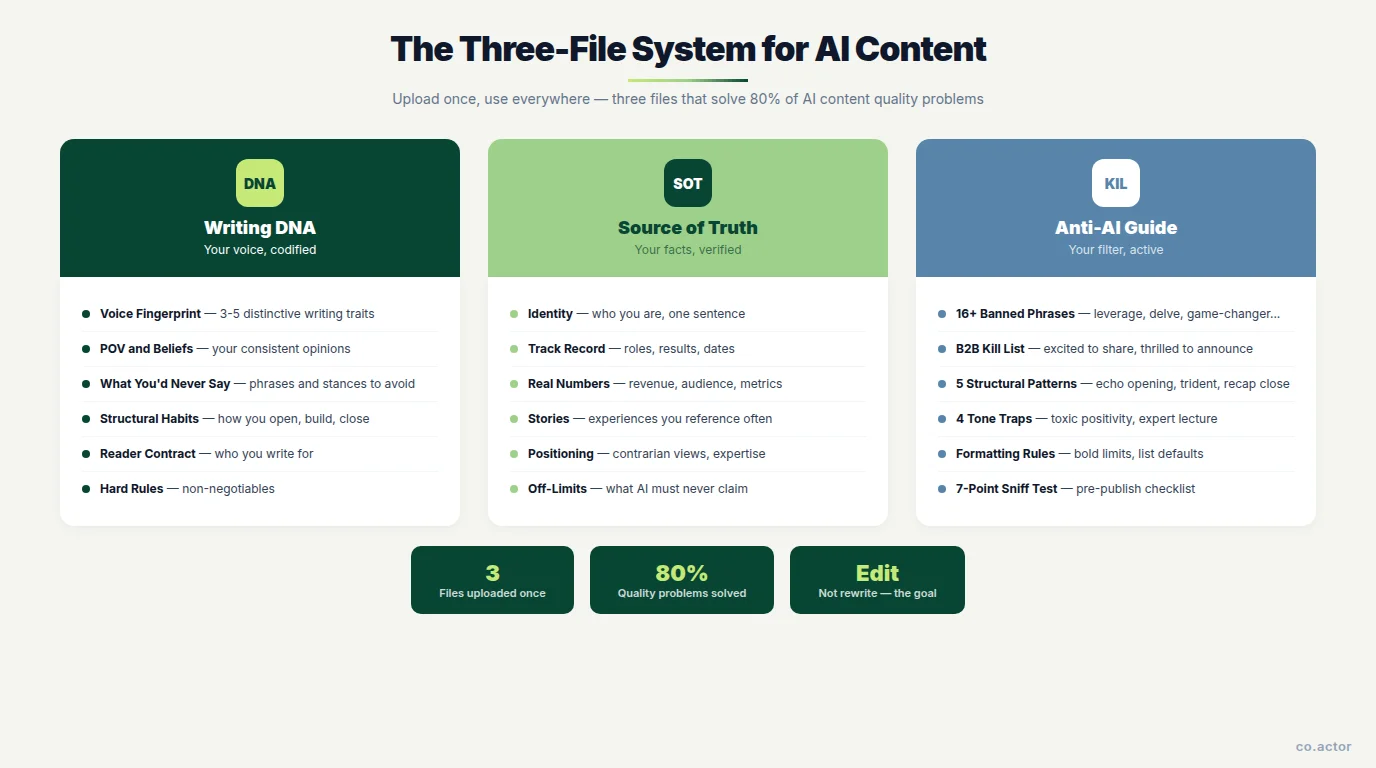
File 3: The Anti-AI Writing Guide
The third file is a filter. Your Writing DNA tells AI how to sound. Your Source of Truth tells it what's true. The Anti-AI Writing Guide tells it what to kill.
These are the phrases and patterns that mark content as machine-made to every reader who's spent any time on LinkedIn. They're not random — they're the statistical habits of AI trained on generic professional writing.
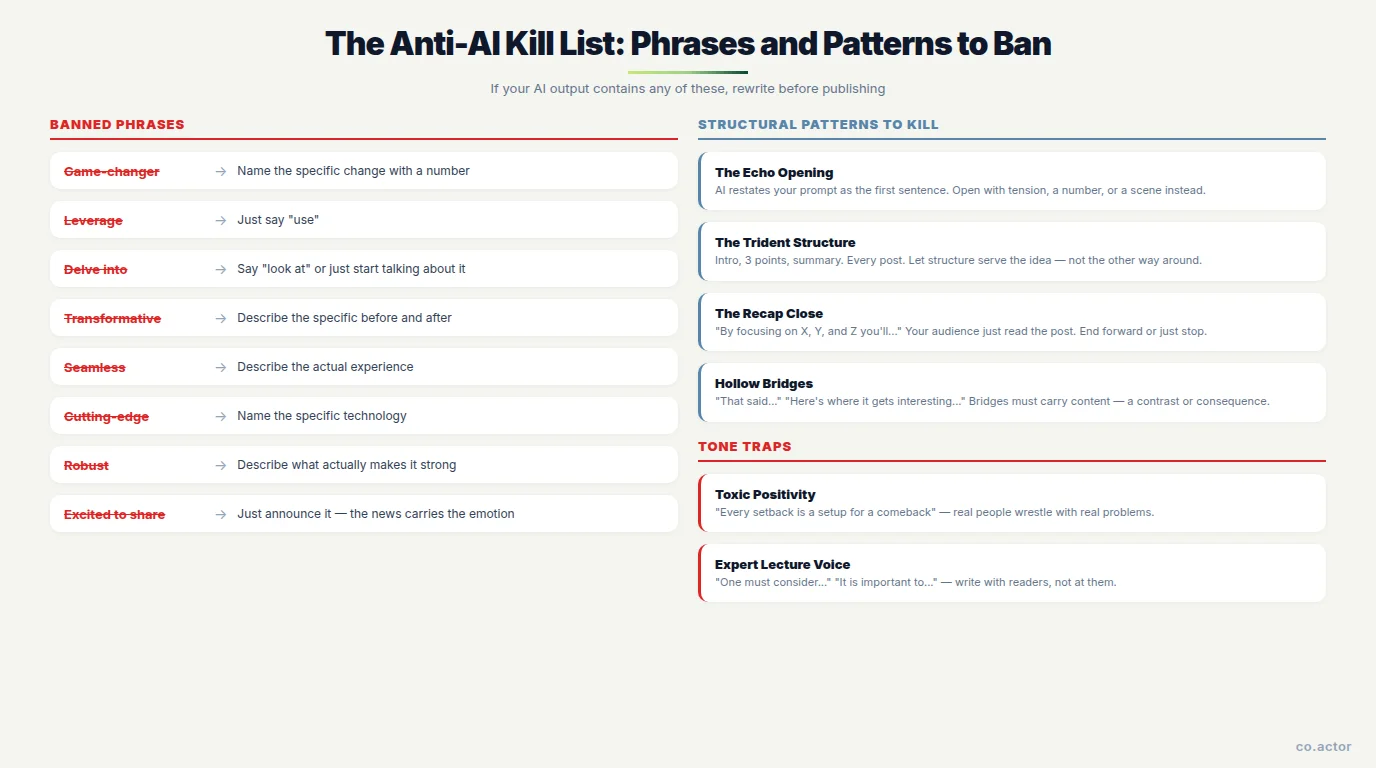
The Kill List: Banned Phrases
- "Game-changer" — name the specific change with a number instead
- "Leverage" (as a verb) — just say "use"
- "Navigate challenges" — name the actual challenge
- "The [X] landscape" — say "market," "industry," or be specific
- "It's no secret that..." — delete it. Start with the fact
- "Elevate your [anything]" — say "improve," "grow," or describe the outcome
- "Streamline" — say "simplify," "speed up," or describe what changes
- "Cutting-edge" / "state-of-the-art" — name the specific technology
- "Robust" — describe what actually makes it strong
- "Seamless" — describe the actual experience
- "Transformative" — describe the specific before and after
- "Delve into" — say "look at" or just start talking about it
- "Pivotal" — say "important" or explain why it matters
- "Foster growth" — say "build," "create," or "encourage"
- "Spearhead" — say "lead," "start," or "run"
- "Myriad" — use the real number, or say "many"
B2B and Founder-Specific Phrases to Kill
- "Excited to share" / "Thrilled to announce" — just announce it. The emotion is in the news, not the framing
- "In my experience..." — only use it if an actual experience follows in the same sentence
- "The truth is..." / "Here's the honest truth" — if it needs this preamble, the point isn't landing
- "I've been thinking a lot about..." — you're either sharing a thought or you're not
- "Worth noting..." — if it's worth noting, note it
- "At the risk of being controversial..." — the controversy should speak for itself
- "PSA:" — reserved for actual public service announcements
Structural Patterns to Kill
The Echo Opening — AI restates your prompt as the first sentence. "Write about hiring" becomes "Hiring was one of the best decisions I made." Fix: open with a scene, a tension, or a number. Never with the topic.
The Trident Structure — Intro, Point 1, Point 2, Point 3, summary. Every post, every time. Fix: let the structure serve the idea. Some posts are single arguments with proof. Some are stories. Some are just one observation and a question.
The Recap Close — AI ends by restating what it just said. "By focusing on X, Y, and Z, you'll be able to..." Fix: end forward. A real thought. A question. Or just stop.
The False Truce — "While there are certainly challenges, there are also incredible opportunities." Fix: have a position. Real writing commits to one side and accepts that some readers will disagree.
Hollow Bridges — "That said..." "With that in mind..." "Here's where it gets interesting..." These carry no information. If two paragraphs need a bridge, make the bridge carry content — a contrast, a consequence, a complication.
Tone Traps to Avoid
Toxic Positivity. "Every setback is a setup for a comeback." "Failure is just a stepping stone." Real people wrestle with real problems. When everything is framed as an opportunity, nothing reads as honest.
Expert Lecture Voice. Writing that talks at your audience instead of with them. Recognizable by phrases like "one must," "it is important to," or third-person declarations about what "leaders" do.
The Humble Brag Opener. "I'm so humbled to announce..." These signal exactly the opposite of humility. Open with the fact or the insight, not the emotional framing.
Inspirational Close. The final paragraph that exists only to feel good. "Remember: the best time to start was yesterday." Delete it. If the post doesn't land without it, the body isn't strong enough.
Formatting Habits to Break
- Excessive bold: AI bolds every key phrase. Max 1-2 bold elements per post. Emphasis loses power when overused
- The list-of-5-or-7 default: AI always picks 5, 7, or 10 items. Use the real number
- Hashtag blocks: Mostly useless on LinkedIn now. Max 1-2 specific hashtags if any
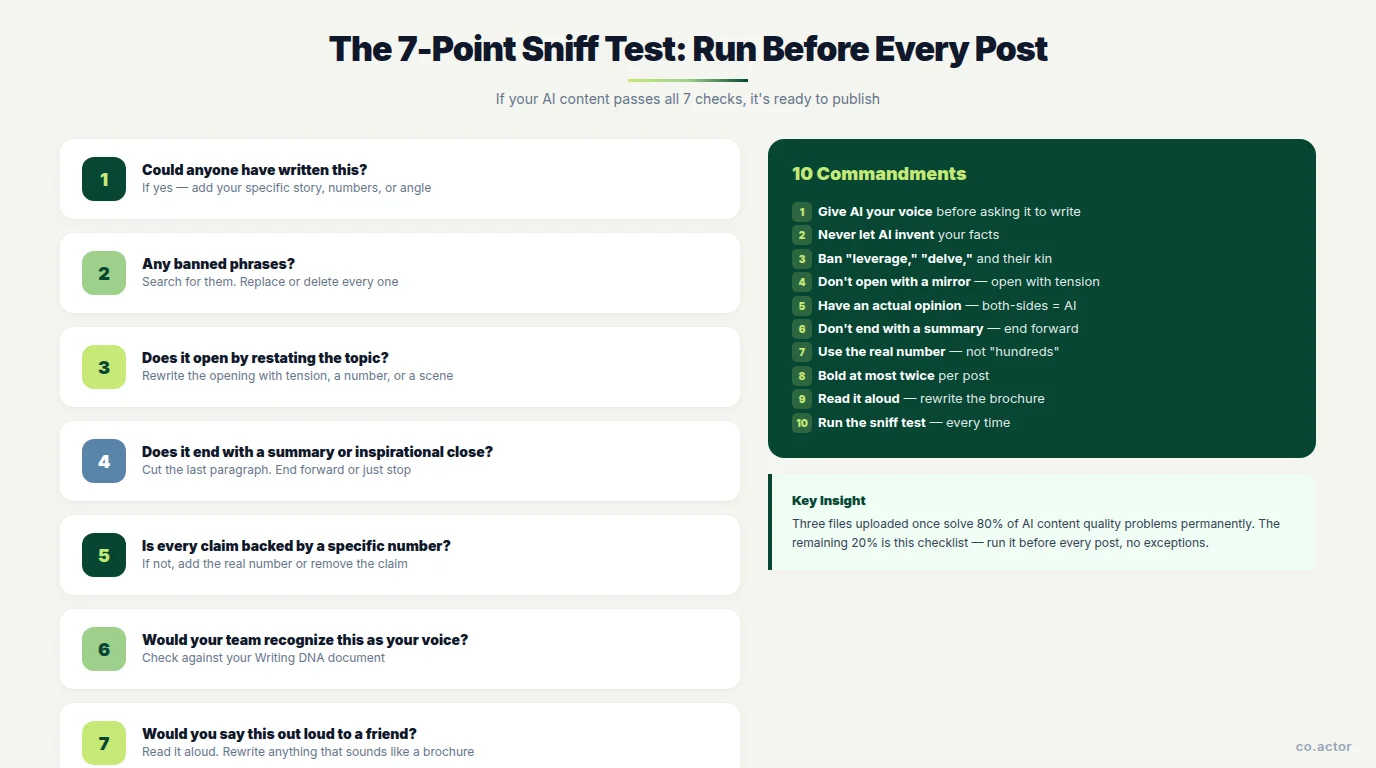
The 7-Point Sniff Test
Before publishing any AI-assisted content, run it through these questions:
- Could anyone have written this? If yes — add your specific story, numbers, or angle
- Any banned phrases? Search for them. Replace or delete
- Does it open by restating the topic? Rewrite the opening
- Does it end with a summary or inspirational close? Cut the last paragraph
- Is every claim backed by a specific number? If not, add or remove the claim
- Would your team recognize this as your voice? Check against your Writing DNA
- Would you say this out loud to a friend? Read it aloud. Rewrite anything that sounds like a brochure
How to Set This Up in 15 Minutes
In Claude
Go to Projects in the left sidebar. Create a new project — "LinkedIn Content" or similar. Upload all three files to the project's knowledge base. In project instructions, paste:
"Always reference the uploaded Writing DNA, Source of Truth, and Anti-AI Writing Guide when creating content. If any banned phrase or pattern from the guide appears in your output, rewrite it before responding."
Every conversation in that project now has your voice, your facts, and your filter running automatically.
In ChatGPT
Upload all three files at the start of any content conversation. Or create a custom GPT with the files built in.
Ongoing Maintenance
- Source of Truth: update quarterly — when business numbers change, update the document first
- Writing DNA: update every 6 months — your voice evolves
- Anti-AI Writing Guide: largely stable, but add phrases you notice over time
The 10 Commandments of Anti-AI Writing
- Give AI your voice before asking it to write. A Writing DNA is not optional. It's the foundation
- Never let AI invent your facts. If the number isn't in your Source of Truth, it doesn't belong in the post
- Ban "leverage," "delve," and their kin. Search before you publish. Replace with the specific word
- Don't open with a mirror. The first sentence must not restate the topic. Open with tension, a number, or a scene
- Have an actual opinion. Both-sides hedging reads as AI. Pick a side
- Don't end with a summary. Your audience just read the post. They know what was in it
- Use the real number. "Hundreds" becomes 347. "Years" becomes "since March 2022." "Over a million" becomes 1.2 million
- Bold at most two things per post. Bold loses all meaning after the second instance
- Read it aloud. If you wouldn't say it to a colleague, rewrite it
- Run the sniff test. Every time. No exceptions
Your Action Items This Week
- Build your Writing DNA — paste the prompt above into Claude, answer the questions, save the output as Writing_DNA.md
- Build your Source of Truth — run the second prompt, fact-check every number and date before saving
- Create a Claude Project — upload both files, add the project instruction. Every LinkedIn conversation now runs through your system
- Run the sniff test on your last 3 posts — retroactively. Identify which banned phrases appeared. That's your personal kill list
- Add one rule to your Anti-AI Guide — something specific to your voice that AI gets wrong every time
Frequently Asked Questions
How do I make AI-generated LinkedIn content sound like me?
Create a Writing DNA document that captures your specific voice patterns, beliefs, structural habits, and hard rules. Upload it to a Claude Project or ChatGPT so every piece of content starts from your voice. The key is showing AI what you actually sound like through real writing samples, not just telling it to "be conversational."
What are the most common AI phrases to avoid on LinkedIn?
The most flagged: game-changer, leverage (as a verb), delve into, transformative, seamless, cutting-edge, robust, and "excited to share." B2B-specific: "thrilled to announce," "in my experience" (without a specific experience following), and "the truth is." Replace each with specific, concrete language.
Can B2B decision-makers detect AI-generated content?
Yes. The 2025 Edelman B2B Thought Leadership Study found that the majority of B2B decision-makers can identify AI-generated content on sight, and when they do, it actively reduces their trust in the author.
What is the three-file system for AI content?
Three documents uploaded to your AI project: (1) Writing DNA — your voice codified; (2) Source of Truth — your facts verified; (3) Anti-AI Writing Guide — your filter active. Together they solve 80% of AI content quality problems. The goal shifts from rewriting AI output to editing it.
How often should I update my AI writing files?
Source of Truth: quarterly when business numbers change. Writing DNA: every 6 months as your voice evolves. Anti-AI Writing Guide: largely stable, update when you notice new AI-generated phrases appearing.
What is the 7-point sniff test for AI content?
Seven questions to ask before publishing: Could anyone have written this? Any banned phrases? Does it open by restating the topic? Does it end with a summary? Is every claim backed by a specific number? Would your team recognize your voice? Would you say this out loud? If any answer raises a flag, rewrite that section.
Build Your AI Content System
Serge Bulaev is the CEO and founder of Co.Actor, a LinkedIn growth platform for B2B founders and their teams. He writes about content systems, personal branding, and the intersection of AI and authentic communication on LinkedIn.
Sources
- Edelman + LinkedIn — B2B Thought Leadership Impact Study 2025
- Trust Insights — Unofficial LinkedIn Algorithm Guide Q1 2026
- Silicon Valley Girl — Anti-AI Writing Guide
Related Reading
- The LinkedIn Content Engine: Build a Repeatable System Without Burning Out
- The Viral LinkedIn Post Formula: Data-Backed Framework for 2026
- The Personal Brand Playbook: LinkedIn Strategy for B2B Founders
- The LinkedIn Networking Playbook: Build Real Relationships at Scale
- LinkedIn for Founders: The Complete Growth Guide for 2026
Written by
