Sooner or later, LinkedIn puts the question in front of you. You click on someone's profile and a gold badge nudges you. You go to send a message and hit a wall that says upgrade to reach them. You search for people and LinkedIn tells you you've hit a limit. Then the offer: one month free.
So is LinkedIn Premium worth it in 2026? The honest answer isn't yes, and isn't no. It's: it depends entirely on what you're trying to do — and most people pay for the wrong reason. This is the straight version: what the five plans cost this year (some prices changed, and there's a brand-new one), what you actually get, whether it does anything, and who should genuinely pay versus who's lighting money on fire. No jargon. No affiliate pitch.
If You Only Have 60 Seconds
- Five main paid plans in 2026: Premium Career (~$29.99/mo), Premium Business ($59.99/mo), the new Premium All-in-One ($89.99/mo), Sales Navigator (~$99–149/mo), and Recruiter Lite (~$170/mo).
- Prices are creeping up. New subscribers now see Premium Career at up to $39.99/mo month-to-month. Always check the actual number at checkout — LinkedIn runs live price tests.
- Premium does NOT boost your reach. The feed treats free and paid users exactly the same. Paying does not get your posts seen by more people.
- What you're really buying is capacity and information — more messages to strangers, the full who-viewed-you list, insights on jobs and companies, and a pile of AI tools. It only pays off if you use it hard.
- It's genuinely worth it for three people: the active job seeker, the full-time salesperson, and the recruiter. For everyone else, the free version is usually enough.
One thing to hold onto before the trial: the free month auto-charges you if you don't cancel, and if you pick annual billing, you're billed for the whole year up front.
In this article
- First, what are you even paying for?
- The plans and what they cost in 2026
- The new one: Premium All-in-One
- What you actually get with Premium Career
- Does it actually help you get a job?
- So who should actually pay?
- The catches nobody points out
- The smartest way to decide
- Frequently asked questions
First, What Are You Even Paying For?
The single most useful idea in this whole breakdown, before the price list: LinkedIn Premium does not make you more visible. It makes you more capable.
That distinction is where most people waste their money. They pay expecting their posts to reach more people, or their profile to rank higher. It doesn't work that way. An independent 2026 review put it bluntly: the LinkedIn algorithm treats free and Premium accounts identically for content distribution (Everything-PR, 2026).
So what does the money actually buy? Three things:
- Reach out to more people — messages to strangers (InMail), no limits on how many profiles you can browse.
- See more — the full list of who viewed your profile, how you stack up against other job applicants, salary and company data.
- AI help — tools that write your profile, draft your messages, and coach you.
Every one of those is a tool you have to pick up and use. Premium is a gym membership, not a personal trainer. Pay for it and ignore it, and it does nothing.
The Plans and What They Cost in 2026
Here's the full 2026 lineup, US prices. A note that matters: these are the cheaper annual-billing prices. Paying month-to-month runs about 20–25% more, and LinkedIn is actively testing higher prices on new sign-ups (Cleanlist, 2026).
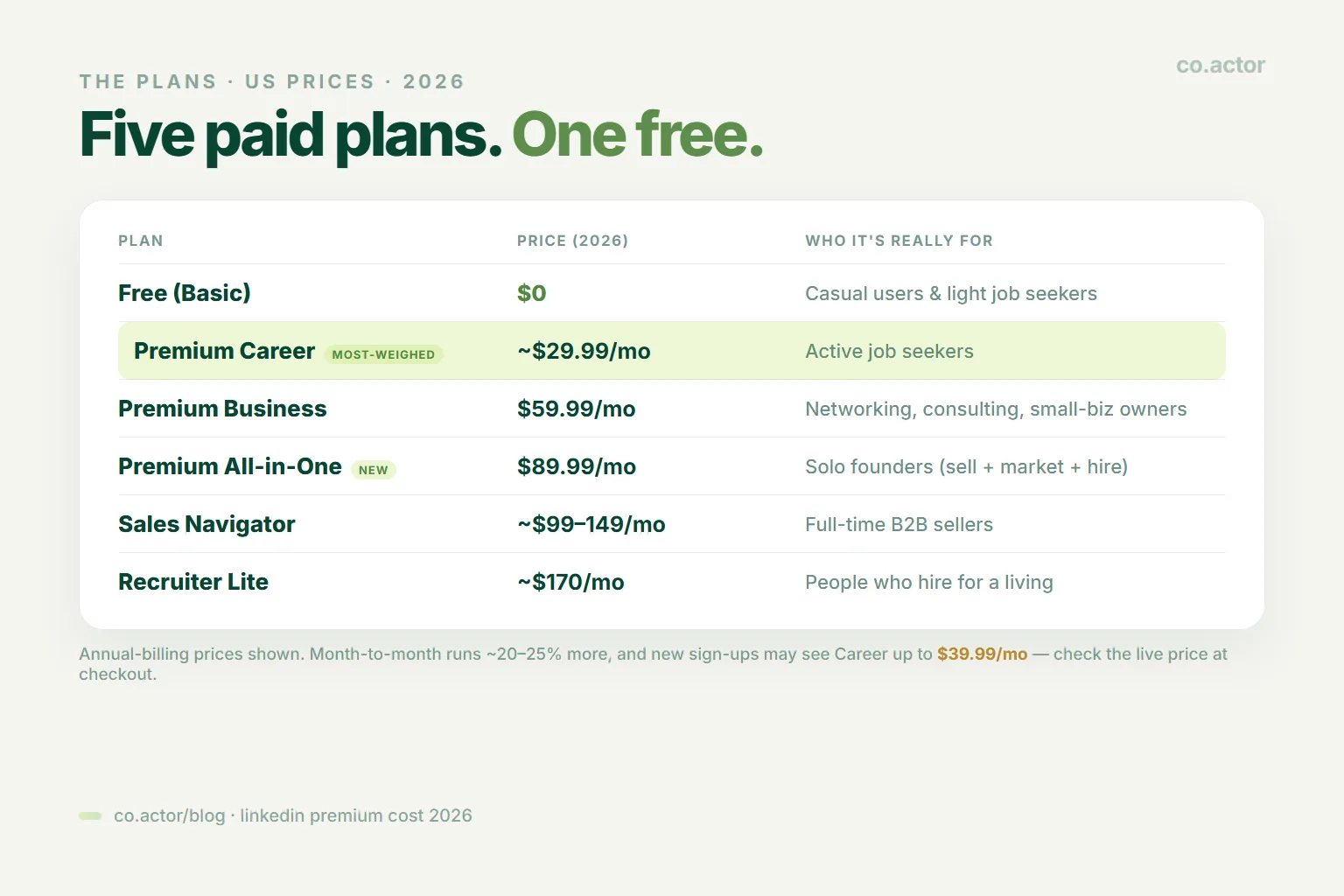
| Plan | Price (2026) | Who it's really for |
|---|---|---|
| Free (Basic) | $0 | Casual users and light job seekers — more than people think. |
| Premium Career | ~$29.99/mo (up to $39.99 month-to-month) | Job seekers. The one most individuals are deciding about. |
| Premium Business | $59.99/mo | Networking, consulting, small-business owners not doing full-time sales. |
| Premium All-in-One | $89.99/mo | Small-business owners wanting sales, marketing, and hiring in one bundle. |
| Sales Navigator | ~$99/mo (Core), ~$149/mo (Advanced) | Anyone doing B2B outbound for a living. |
| Recruiter Lite | ~$170/mo | People who hire for a living. |
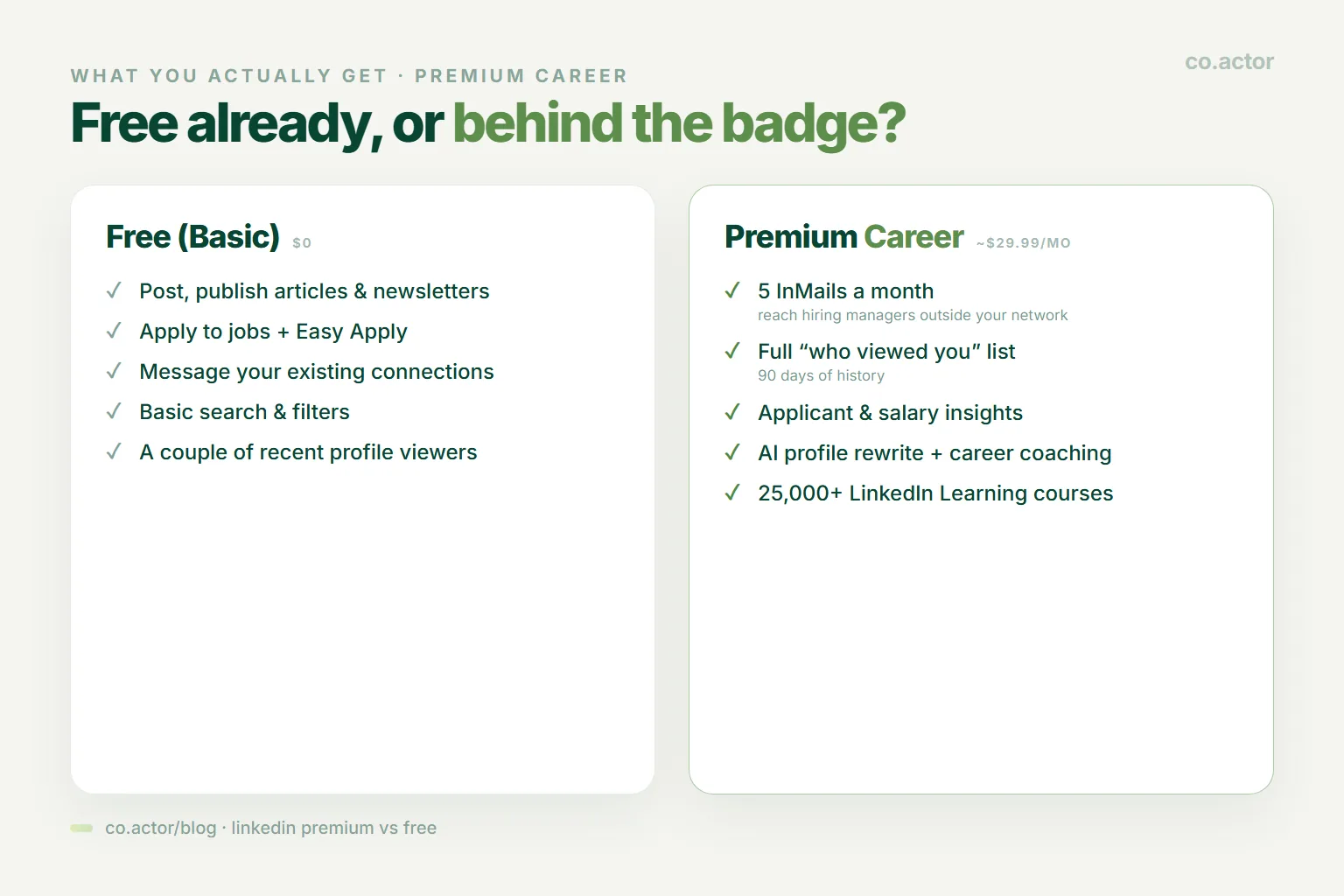
Free (Basic) is more than people think. You can post, apply to jobs, message your existing connections, do basic searches, and see a couple of recent profile viewers. For a lot of people this is genuinely all they need.
Sales Navigator is the serious sales machine. If you do B2B outbound for a living, this — not Career or Business — is the real tool (La Growth Machine, 2026). If that's you, pair the tool with a real process; our sales playbook covers the outbound side.
Key Takeaway: Annual billing saves you roughly 17–30%, but you pay the entire year in one charge. That discount is also the trap that catches people later.
The New One: Premium All-in-One
If you run a small business, this is the 2026 headline. On February 12, 2026, LinkedIn launched a brand-new plan called Premium All-in-One (official announcement). It's aimed squarely at founders, solopreneurs, and small teams wearing multiple hats — the people who are the salesperson, the marketer, and the recruiter all at once.
For $89.99/mo it folds three jobs into one dashboard:
- Selling — unlimited prospect searches, daily suggestions of people to reach, messages to strangers, an AI assistant that personalizes your outreach.
- Marketing — post boost credits, a Company Spotlight feature, and an auto-invite tool that pulls in people who engage with your content.
- Hiring — job promotion credits so your open roles get seen.
LinkedIn's own early numbers on it: up to a 60% lift in reply rates, a 57% rise in followers, and 40% more profile views for small businesses using it. Read those with one eyebrow raised — they're LinkedIn's marketing figures, not independent results. But the plan itself is real, and if you're a solo founder currently deciding between three separate subscriptions, one bundle at $89.99 may genuinely be the cheaper, saner path. It's rolling out gradually, so you may not see it in your account yet.
What You Actually Get With Premium Career
Since Premium Career is the one most individuals weigh, here's exactly what's inside in 2026, straight from LinkedIn's own plan page:
- 5 messages to strangers per month (InMail) — reach hiring managers who aren't in your network.
- The full "who viewed your profile" list — 90 days of history, instead of the one or two names free users see.
- Applicant insights — on a job posting, you see how your profile compares to other people applying.
- Salary insights — pay ranges for roles you're eyeing.
- Interview prep — practice questions and tips.
- 25,000+ LinkedIn Learning courses — the full library.
- A Premium badge — cosmetic, mild credibility, don't overthink it.
And the 2026 addition everyone's curious about — the AI tools: an AI assistant that rewrites your profile (headline, About section, experience bullets), AI insights on job posts that read a listing and tell you how well you fit, and AI career coaching through LinkedIn Learning.
Here's the catch with the AI, and it's the theme of Premium in 2026: almost all of it sits behind the paywall. Free users get, at most, a stripped-down taste. If the AI profile-writing and coaching genuinely save you time, that's a real reason to pay. If you'd never open them, you're paying for a feature list you'll ignore. (If a writing assistant is the whole appeal, it's worth comparing dedicated AI writing tools before you buy the badge for it.)
Does It Actually Help You Get a Job?
This is the question under the question. So let's separate what LinkedIn claims from what's actually proven.
What LinkedIn says
Premium Career users get hired "2x faster" (Evaboot, 2026) — one source even cites LinkedIn saying "almost 3x faster" (Icypeas, 2026). "Premium members are 2.6x more likely to get hired," and "LinkedIn messages are 4.6x more effective than cold email" (Salesbread, 2026).
Those numbers sound great. Here's the honest part: they're all LinkedIn's own figures, quoted in marketing. As of 2026 there's no independent study that reproduces them, and LinkedIn hasn't published how they were measured. Treat them as advertising, not proof.
What's actually reasonable to believe
Premium doesn't cast a spell. What it does is give an active job seeker more shots and better aim — five direct lines to hiring managers a month, a clear read on how you compare to other applicants, and AI help to tighten your profile. If you use those hard, it's plausible you move faster. If you subscribe and keep applying passively, the badge does nothing.
Key Takeaway: The mistake is thinking payment itself is the advantage. The activity is the advantage. Premium just raises the ceiling on it.
So Who Should Actually Pay?
Here's the whole breakdown in one screen. Find yourself.
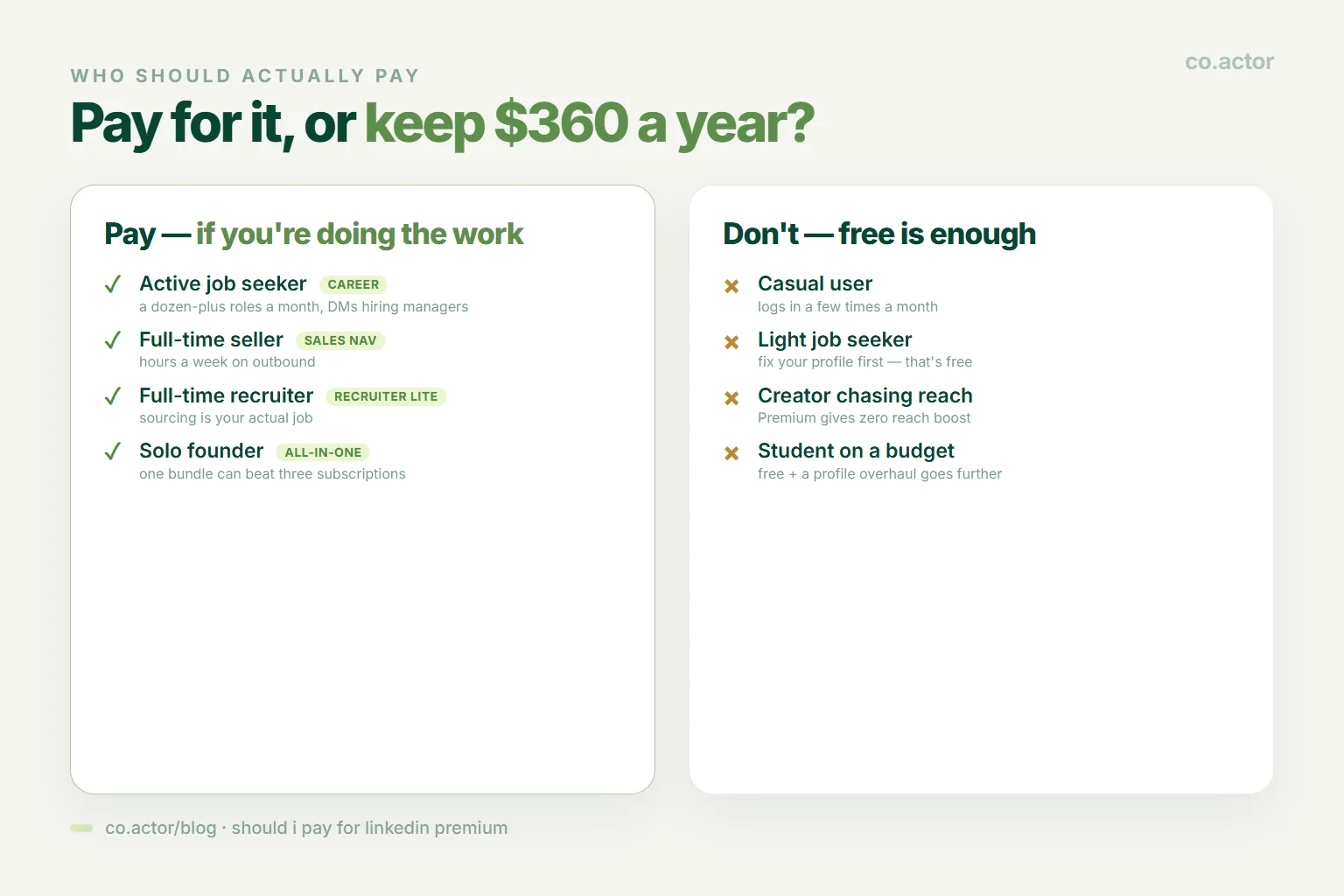
Pay for it — Premium Career — if you're an active job seeker. You're applying to a dozen-plus roles a month and willing to message hiring managers directly. The InMails, applicant insights, and AI profile help earn their keep. This is the clearest yes.
Pay for it — Sales Navigator — if you sell for a living. You spend hours a week on outbound. Career and Business aren't built for that; Sales Navigator is. Don't buy the cheaper plan hoping it'll do a sales job — it won't.
Pay for it — Recruiter Lite — if you hire for a living. Sourcing candidates is your actual job, not an occasional task.
Consider All-in-One if you're a solo founder juggling sales, marketing, and hiring — one bundle can beat three subscriptions.
Don't pay — the free version is enough — if you're:
- A casual user who logs in a few times a month. Building relationships instead? Our networking playbook costs nothing to run.
- A light job seeker sending a handful of applications. Fix your profile first (that's free) before you pay.
- A creator or personal brand chasing reach. This is the big one: Premium gives you zero reach boost. If you're paying to be seen more, stop — you're paying for nothing.
- A student on a budget — unless you're mid-intense-job-hunt, free plus a free profile overhaul goes further.
If you don't see yourself in the "pay" list, that's not you missing out. That's you keeping $360 a year.
The Catches Nobody Points Out
Because we don't do sales talk here, the fine print — all still true in 2026:
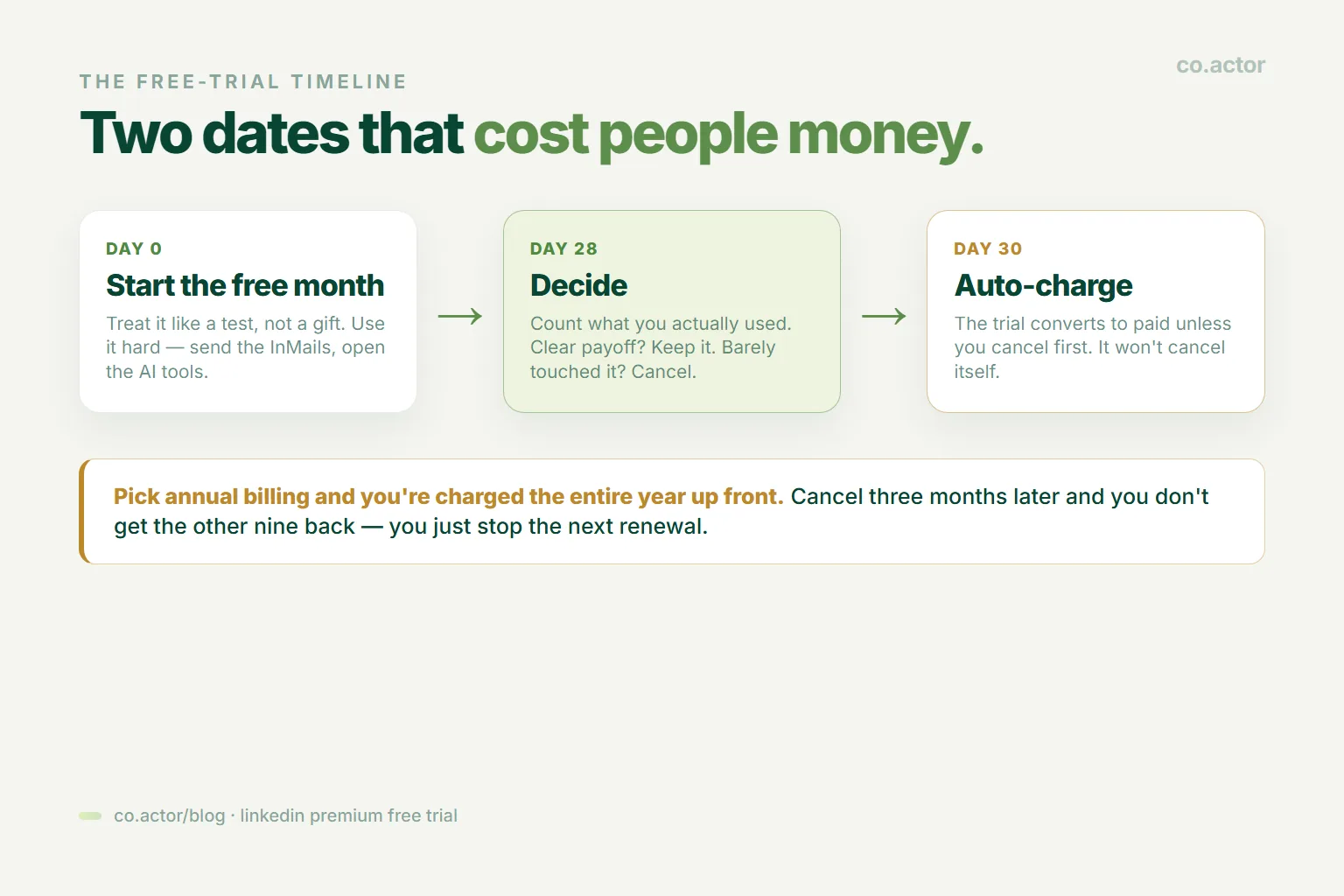
- The free trial auto-charges you. The "1 month free" quietly converts to a paid subscription the day it ends unless you cancel first. Set a reminder for day 28.
- Annual billing hits all at once. Pick the discounted yearly plan and you're charged the entire year right after the trial. Cancel three months later and you don't get the other nine months back — you just stop the next renewal.
- One trial per plan, forever. Used your Premium Career free month already? You generally can't get it again on the same account.
- It won't cancel itself. Deleting the app or ignoring the emails does nothing. You have to go into settings and cancel before the renewal date — here's how to cancel without losing the rest of your billing period.
- You're already paying for things you think are Premium. Posting, articles, newsletters, basic job search and easy-apply, messaging your connections, basic filters — all free. Premium adds depth and volume, not whole new abilities.
The Smartest Way to Decide
Don't agonize. Run the experiment.
- Take the free month — but treat it like a test, not a gift.
- Use it hard for 30 days. Send the InMails. Open the AI tools. Read the insights. Actually try the thing.
- Count what you used. Messages sent, applications improved, replies or calls you got that you wouldn't have otherwise.
- On day 28, look at the tally. Clear payoff? Keep it — go annual for the discount. Barely touched it? Cancel without a second thought.
The people who regret Premium aren't the ones who tried it. They're the ones who paid for twelve months, used it twice, and forgot to cancel. Don't be that person. Let the free month tell you the truth.
LinkedIn Premium isn't a scam, and it isn't magic. It's a set of tools that raises the ceiling for people who are already doing the work — hunting hard for a job, selling every day, or hiring full-time. For everyone else, the honest answer in 2026 is the one LinkedIn will never put in a popup: you probably don't need it. Fix your profile, post consistently, and message real people — all free — and you'll outperform most of the badges on the platform. Pay for capability you'll actually use. Never pay for visibility you were promised but won't get.
Frequently Asked Questions
Is LinkedIn Premium worth it in 2026?
It depends on what you're trying to do. It's genuinely worth it for active job seekers (Premium Career), full-time salespeople (Sales Navigator), and recruiters (Recruiter Lite) — plus solo founders juggling three jobs (All-in-One). For casual users, light job hunters, and creators chasing reach, free is usually enough.
Does LinkedIn Premium boost your reach?
No. The feed treats free and paid accounts identically for content distribution. Paying does not get your posts seen by more people. What you buy is capacity and information, not visibility.
How much does LinkedIn Premium cost in 2026?
Annual-billing US prices: Premium Career ~$29.99/mo (up to $39.99 month-to-month for new subscribers), Premium Business $59.99/mo, Premium All-in-One $89.99/mo, Sales Navigator ~$99–149/mo, and Recruiter Lite ~$170/mo. Month-to-month runs about 20–25% more.
What is Premium All-in-One?
A new plan LinkedIn launched on February 12, 2026, for founders and small teams. At $89.99/mo it bundles selling, marketing, and hiring tools into one dashboard. It's rolling out gradually, so you may not see it in your account yet.
Does Premium actually help you get a job faster?
LinkedIn claims "2x faster" and "2.6x more likely to get hired," but those are LinkedIn's own marketing figures with no independent study behind them. What's fair to say: Premium gives an active job seeker more shots and better aim. The activity is the advantage; Premium raises the ceiling on it.
Does the free trial auto-charge you?
Yes. The free month converts to a paid subscription unless you cancel before it ends — set a reminder for day 28. With annual billing, you're charged the whole year up front, and cancelling later only stops the next renewal.
The Thing Premium Can't Buy
Serge Bulaev is the CEO and founder of Co.Actor, a LinkedIn growth platform for B2B founders and their teams. He writes about content systems, profile positioning, and how the LinkedIn algorithm actually rewards modern creators.
Related Reading
Written by
