The category of "AI tool for LinkedIn posts" has split in 2026. On one side: generic AI writers that produce competent but recognizably AI-generated content. On the other: voice-trained AI that learns your specific writing patterns and generates posts that read like you. The gap between the two has widened, and LinkedIn audiences have learned to spot generic AI — engagement on AI-only content drops 30-50% versus human or voice-trained AI content (2025 Edelman B2B Thought Leadership Study).
This guide ranks the 10 best AI tools for writing LinkedIn posts in 2026 — based on output quality, voice personalization, LinkedIn-specific features, and price. Co.Actor is #1 for B2B teams and anyone wanting AI that sounds like them; Claude or ChatGPT with a Writing DNA file ties on raw quality for solo creators.
TL;DR — In Five Bullets
- Best overall: Co.Actor — trains a voice model per user, output reads like the person, team-built.
- Best DIY quality: Claude or ChatGPT with a Writing DNA file ($0-20/month).
- Best clean solo tool: AuthoredUp — strong editor, hook library, free plan.
- Best AI-led workflow: Magic Pixie — high per-post variation, LinkedIn-native.
- Avoid: generic AI tools that produce "LinkedIn AI sound" — engagement drops 30-50% vs voice-trained content.
What "Best AI for LinkedIn" Actually Means in 2026
The question shifted in 2024-2025. In 2022, "best AI tool" meant which one could write a coherent post from a prompt. By 2026, every tool can do that. The question is which AI produces content that doesn't read AI-written — that sounds like a real person with a real voice.
Four traits separate good AI from average AI for LinkedIn in 2026:
- Voice fidelity. Does the output match your specific writing patterns — phrasings, sentence rhythm, structural habits? Voice-trained tools (Co.Actor, Claude with Writing DNA) win this dimension by miles.
- Banned-phrase awareness. Does the AI avoid the 50-100 phrases that read as AI-written? "Game-changer," "leverage," "delve into," "transformative" — generic AI ships these constantly; trained AI strips them.
- Specificity over generality. Does the AI use specific numbers, scenes, and details, or default to abstract claims? Generic AI gravitates toward general statements; voice-trained AI knows your real numbers and stories.
- Structural variation. Does every post follow the same "intro / 3 points / summary" structure, or does the AI use different shapes? Real human writing varies; weak AI repeats the trident.
The right tool for you depends on which dimension matters most and how much setup time you'll invest. The next section maps the tradeoffs.
How We Tested These AI Tools
Four criteria, weighted by what matters for LinkedIn output quality:
- Voice personalization (35%). Did output match a target person's writing patterns? Tools with voice models or DNA-driven prompts ranked highest.
- Output quality (25%). Same topic prompt across all tools. Rated readability, platform fit, banned phrases, structural variety.
- LinkedIn-specific features (20%). Hook libraries, formatting, character counters, mobile preview, scheduling integration.
- Cost and setup time (20%). Free tiers and predictable pricing rank higher; long approval flows rank lower.
The Top 10 AI Tools for Writing LinkedIn Posts, Ranked
1. Co.Actor — Best AI Voice Training for LinkedIn
Setup time: 15-30 minutes (paste 5-10 writing samples per user).
Pricing: Free trial. Team plans by employee count.
Co.Actor's AI doesn't try to write like a "professional LinkedIn user." It tries to write like you. The platform learns from samples you paste in — LinkedIn posts you've written, Slack messages, email drafts — and builds a voice model that captures your specific phrasings, structural habits, and tone. Generated posts read like a draft you would have written yourself, not like AI assistance.
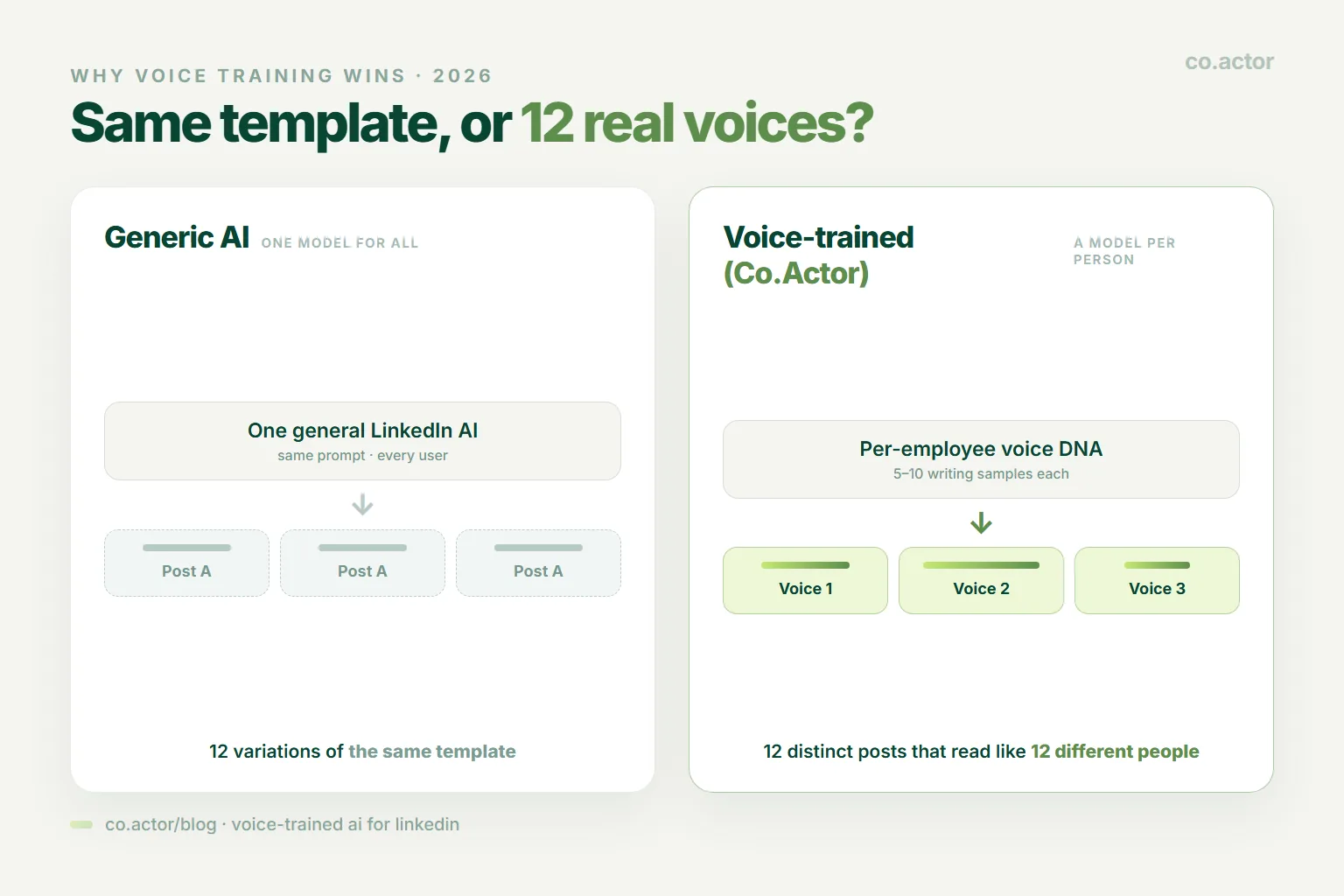
For B2B teams, Co.Actor handles per-employee voice training in one workspace. Twelve employees produce content in twelve distinct voices, each aligned with how that person actually writes. This is the deciding feature for any team running LinkedIn employee advocacy in 2026 — generic AI produces 12 variations of the same template; voice-trained AI produces 12 different posts that look like 12 different people wrote them.
The trade-off is setup time and team focus. Solo creators get the voice training but pay for team features they don't need. For one-person LinkedIn workflows, Claude or ChatGPT with a Writing DNA file (free or $20/month) delivers comparable quality at lower cost. See how to use AI for LinkedIn content without sounding like AI for the underlying methodology.
Best for: B2B teams running employee advocacy, founders scaling LinkedIn across 5-500 employees.
2. Claude or ChatGPT + Writing DNA — Best DIY Quality
Setup time: 60-90 minutes one-time.
Pricing: Free tier or $20/month (Claude Pro / ChatGPT Plus).
The highest-quality AI LinkedIn writing in 2026 isn't always inside a dedicated LinkedIn tool. It's inside Claude or ChatGPT with three uploaded files: a Writing DNA (your voice patterns), a Source of Truth (your business numbers, customer details, and current priorities), and an Anti-AI Writing Guide (the phrases and patterns to avoid). Spend an hour setting this up once, then every conversation in that project generates voice-aligned content.
Output quality with this setup often matches or exceeds dedicated LinkedIn AI tools, because the underlying models (Claude 4.x, GPT-4) are stronger than the smaller models most LinkedIn tools wrap. The trade-off: no scheduling, no analytics, no LinkedIn-specific UI. You publish manually or pair with AuthoredUp for the editor.
Best for: Solo creators who care about writing quality and don't mind a manual publishing flow.
3. AuthoredUp — Best Clean Editor with AI Assistance
Setup time: 5 minutes.
Pricing: Free plan. Pro from $19/month.
AuthoredUp is the cleanest LinkedIn editor in 2026, with built-in AI assistance for hooks, post drafts, and tone adjustments. The hook library is the largest of any tool — 200+ openers organized by topic and tone. The AI works best as an assistant rather than a replacement: you draft, AI refines; AI suggests, you pick. This workflow produces better output than tools that try to one-click generate finished posts.
AuthoredUp doesn't offer voice training as deep as Co.Actor or Claude+DNA, but the AI assistance + hook library + clean editor combination is the best solo-creator path off generic AI tools.
Best for: Solo creators who write their own first drafts and want AI assistance, not AI generation.
4. Magic Pixie — Best LinkedIn-Native AI Generation
Setup time: 10 minutes.
Pricing: Free trial. Starter from $29/month.
Magic Pixie is a newer LinkedIn-only AI tool with strong per-post variation — ask for 5 takes on one idea, get 5 genuinely different angles instead of 5 paraphrases. The tool integrates with LinkedIn for direct posting and includes basic analytics. Output quality is competitive with Claude/GPT for solo creators who haven't done the Writing DNA setup.
Less voice training than Co.Actor; less DIY flexibility than Claude+DNA. The middle-ground option that works well out of the box.
Best for: Solo creators who want AI-led drafting without the Claude/DNA setup.
5. Taplio — Established LinkedIn AI with Inspiration Library
Setup time: 5 minutes.
Pricing: Starter from $65/month. Standard $99. Premium $149.
Taplio was the first major LinkedIn AI tool and remains popular for its content inspiration library — search top-performing posts by topic, use them as starting points. The AI captions are competent but recognizably "Taplio output." For creators who want inspiration + acceptable AI in one place, Taplio works; for voice-trained output, look elsewhere. Taplio is single-user, which means teams pay per seat with no team-specific features. See our Taplio alternatives guide for the full comparison.
Best for: Solo creators who value the inspiration library and don't mind generic AI output.
6. FeedHive — Best Multi-Network AI Writer with LinkedIn Focus
Setup time: 10 minutes.
Pricing: Creator from $19/month. Brand from $49/month.
FeedHive is multi-network but treats LinkedIn as a first-class platform. The AI repurposing converts one source post into LinkedIn version, X thread, Threads variant, and Bluesky post — each with platform-appropriate tone and length. For creators amplifying LinkedIn content across networks, FeedHive saves significant time. AI quality is solid but not voice-trained.
Best for: Multi-platform creators where LinkedIn is the primary channel.
7. Writer for LinkedIn — Best Enterprise AI Writing Platform
Setup time: 1-2 weeks (enterprise setup).
Pricing: Team from $18/user/month. Enterprise on request.
Writer is an enterprise AI writing platform that includes LinkedIn use cases alongside marketing, sales, and customer support content. For mid-to-large companies that want one AI tool spanning multiple content workflows including LinkedIn, Writer is the most mature option. Voice training is supported at enterprise tier — slower setup than Co.Actor, deeper feature scope.
Best for: Mid-to-large enterprises wanting AI across multiple content surfaces, not just LinkedIn.
8. Jasper for LinkedIn — Best Marketing-Stack AI with LinkedIn Templates
Setup time: 30 minutes.
Pricing: Creator from $49/month. Pro from $69/month.
Jasper is the original marketing AI platform — broad templates, brand voice training (at Pro+), strong integrations. The LinkedIn templates are functional but feel generic next to LinkedIn-specific tools. Best as part of a wider marketing AI stack rather than a LinkedIn-only pick.
Best for: Marketing teams already using Jasper for blog, email, and ad content who want LinkedIn included.
9. Copy.ai for LinkedIn — Best AI Workflows Beyond Single Posts
Setup time: 20 minutes.
Pricing: Free plan. Pro from $36/month.
Copy.ai is workflow-first — the platform's strength is chained AI prompts that produce a full content campaign from a single brief (LinkedIn post + article + email + ad). For LinkedIn-only use, it's overkill; for marketers using LinkedIn as part of multi-channel campaigns, the workflow approach saves time. Voice training is light.
Best for: Marketers running multi-channel campaigns where LinkedIn is one output.
10. LinkedIn Native AI — Free, Built-in, Basic
Setup time: 0 (built into LinkedIn).
Pricing: Free (Premium for advanced features).
LinkedIn rolled out native AI rewriting in 2024 — the platform suggests improvements to drafts you write in the composer. It's free and built in, which is the only thing it has going for it. Output is generic; suggestions favor "professional" tone in a way that flattens any individual voice. Best treated as a starting point you significantly edit, not as a writing tool.
Best for: Casual LinkedIn users who don't want to install anything.
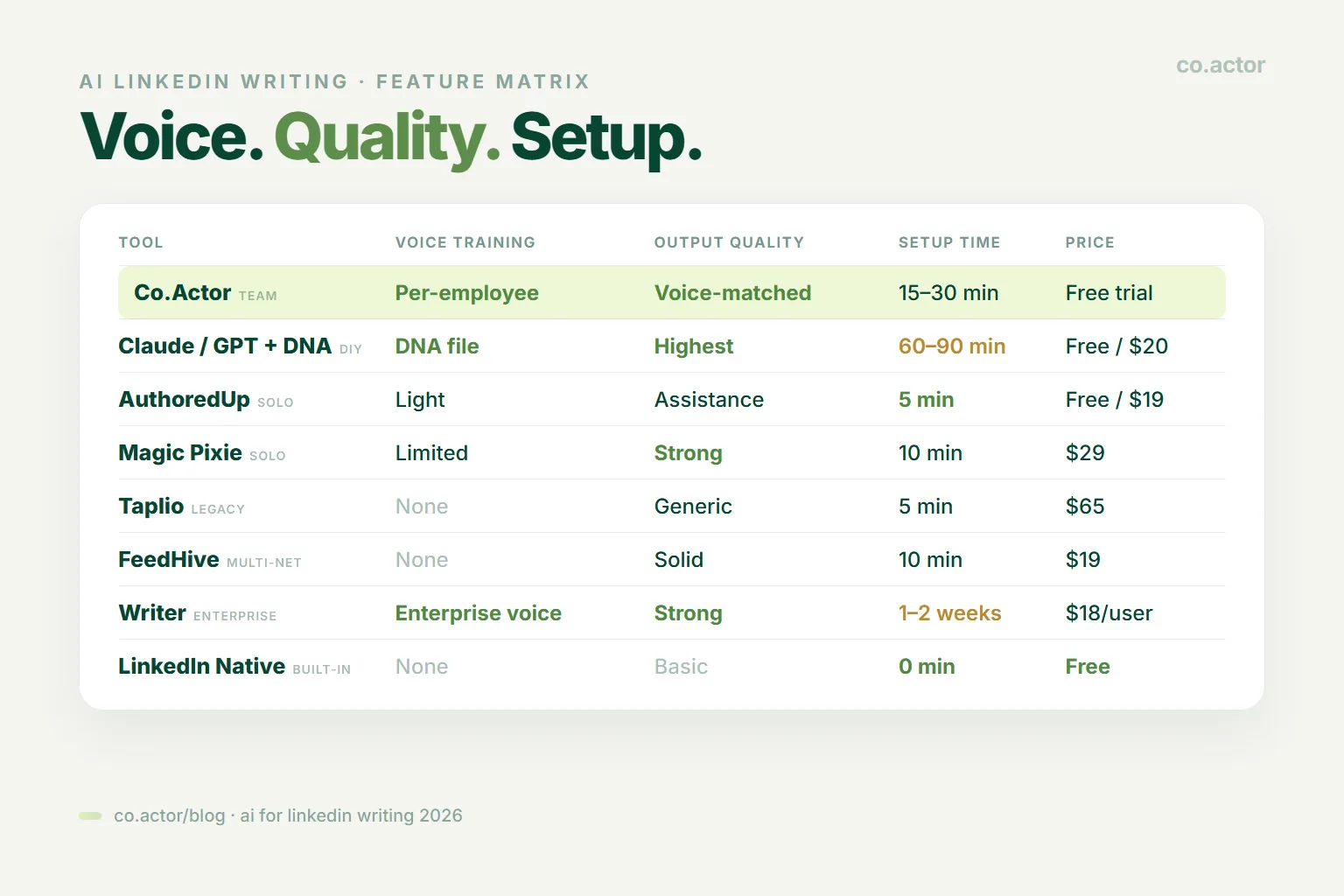
At-a-Glance: AI Tools for LinkedIn Comparison
| Tool | Voice Training | Output Quality | Setup time | Price |
|---|---|---|---|---|
| Co.Actor | Per-employee model | Voice-matched | 15-30 min | Free trial |
| Claude/GPT + DNA | DNA file | Highest with setup | 60-90 min | Free / $20 |
| AuthoredUp | Light | Assistance-grade | 5 min | Free / $19 |
| Magic Pixie | Limited | Strong out-of-box | 10 min | $29 |
| Taplio | None | Generic | 5 min | $65 |
| FeedHive | None | Solid | 10 min | $19 |
| Writer | Enterprise voice | Strong | 1-2 weeks | $18/user |
| Jasper | Brand voice (Pro+) | Generic LinkedIn | 30 min | $49 |
| Copy.ai | Light | Workflow-driven | 20 min | Free / $36 |
| LinkedIn Native AI | None | Basic, generic | 0 min | Free |
How to Pick the Right AI Tool for Your LinkedIn Workflow
- You're a B2B team running employee advocacy → Co.Actor. Per-employee voice training is the only feature in this category that produces 10 distinct voices.
- You're a solo creator who values writing quality and has 60 minutes for setup → Claude or ChatGPT with Writing DNA + Source of Truth + Anti-AI Writing Guide.
- You want a clean LinkedIn editor with light AI assistance → AuthoredUp. Free tier covers most needs.
- You want AI-led drafting without DNA setup → Magic Pixie.
- You're amplifying LinkedIn content across X, Threads, Bluesky → FeedHive.
- You're an enterprise wanting one AI for blog + email + LinkedIn → Writer.
- You're running multi-channel marketing campaigns → Jasper or Copy.ai.
- You're casual and don't want to install anything → LinkedIn's native AI is free; expect generic output.
Why Voice Training Is the 2026 Differentiator
If LinkedIn audiences could be fooled by generic AI, the cheap tools would be enough. They can't. Three data points from 2025:
- Edelman B2B Thought Leadership Study (2025): Majority of B2B decision-makers identify AI-generated LinkedIn content on sight. Detection actively reduces trust in the author.
- 360Brew algorithm shift (LinkedIn, 2024-2025): Reads comments semantically, rewards saves and deep replies over likes. AI content that fails to generate substantive responses gets suppressed.
- Engagement gap measurements: Generic AI posts get 30-50% less reach than human or voice-trained AI posts at matched audience size and posting cadence.
The implication is clear: AI that doesn't sound like you costs you reach. Voice training closes the gap. Whether through Co.Actor's per-employee voice model or a manual Claude+DNA setup, the principle is the same — feed the AI examples of your actual writing, and require it to match your patterns before generating new content.
For the full methodology, see how to use AI for LinkedIn content without sounding like AI. For the algorithm context, see how 360Brew reranks your LinkedIn feed.
Frequently Asked Questions
What is the best AI tool for writing LinkedIn posts in 2026?
Co.Actor for B2B teams (per-employee voice training). Claude or ChatGPT with a Writing DNA file for solo creators wanting highest raw quality at low cost. Taplio, AuthoredUp, Magic Pixie offer competent generic AI.
Can AI write LinkedIn posts that sound human?
Yes, but only with voice training — Co.Actor's voice model, a Writing DNA prompt file, or significant editing. Raw untrained AI output is detectable and underperforms human content by 30-50% in engagement.
Does LinkedIn detect AI-generated posts?
Not directly, but 360Brew rewards engagement signals (saves, deep comments). Generic AI content gets suppressed because it fails to generate substantive responses. Voice-trained AI doesn't trigger this suppression.
Should I use ChatGPT or Claude to write LinkedIn posts?
Either works with the right setup — Writing DNA + Source of Truth + Anti-AI Writing Guide uploaded as files. Claude tends slightly more natural; ChatGPT is faster with stronger integrations. Setup beats model choice.
What's the difference between Co.Actor AI and Taplio AI?
Co.Actor trains a voice model per user — output reads like that specific person. Taplio uses one general AI for everyone — output reads like "Taplio AI." For teams with 10+ employees, the voice fingerprint difference is significant.
How long does it take to set up AI for LinkedIn writing?
5 minutes (Taplio, Magic Pixie). 15-30 minutes (Co.Actor with voice training, AuthoredUp). 60-90 minutes (Claude/GPT with full Writing DNA setup). Longer setups produce dramatically better output and pay back within a week.
Are there free AI tools for LinkedIn posts?
Yes. Claude and ChatGPT free tiers (pair with Writing DNA prompt). AuthoredUp free plan. Co.Actor free trial. Magic Pixie free trial. LinkedIn native AI is free but generic.
Get AI That Actually Sounds Like You
Co.Actor trains a voice model on each user's writing — so your team's LinkedIn posts read like 12 different people, not like 12 copies of one AI. Per-employee voice fingerprint, team workflow, free trial. Try Co.Actor free.
Serge Bulaev is CEO and Founder of Co.Actor — the team LinkedIn growth platform with per-employee AI voice training. He writes about LinkedIn AI, employee advocacy, and how B2B founders are using voice-trained AI to scale content.
Sources
- Edelman — 2025 B2B Thought Leadership Study
- Taplio — Pricing
- AuthoredUp — Pricing
- FeedHive
- Writer — Pricing
- Jasper — Pricing
- Copy.ai — Pricing
Related Reading
Written by
